







ITSpotlight is designed to keep the campus up to date on ITS activities and services.
What’s New in Blackboard Ultra: Gradebook
Posted September 9, 2026
by IDLT
What’s New in Blackboard Ultra: Gradebook
Blackboard Ultra is here and has changed the visuals of all our online learning content, but it also changed some workflow practices that every instructor should be aware of. The Gradebook looks different and requires some different actions as you review, evaluate, and provide feedback on your students’ submissions.
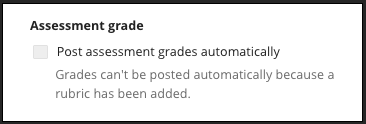
Post Grades is a new step in the grading process . All grades must be posted for students to see their grades and your feedback. Some assignments can be set to post automatically, but sometimes that is not an option. As you create assignments and configure the settings, you will see that the Assessment Settings panel allows some tools and not others. Helpfully, the reason some tools are grayed out or unavailable is often described. For example, assignments graded with a rubric cannot be automatically set to post.
The To Do indicator in the Gradebook tab will assist you with a reminder about any student submissions that have not been graded and a list of all items that have been graded but not yet posted. You can determine if you prefer to post each student’s grade as you assign the score or if you want to wait and post all submissions for an assignment at one time.
Overall Grade is the new total column. Faculty have the option to calculate their students’ final grade based on points or through a weighted total, but both methods should be setup in the Overall Grade in the gradebook. This is also the gradebook column that communicates the student’s current final grade through Starfish, allowing advisors and others involved in student success to view accurate data regarding student support when they are involved in athletics or need an academic intervention.
We always recommend that you use the Student Preview to check your overall grade calculation after you set it up.
Whether you have been using Blackboard for years or just started this fall, please use IDLT’s self-paced resource to review Ultra Gradebook’s features and options .
Finally, remember that scheduling a consult with an instructional designer can be requested for specific concerns you have within your courses as well as for overall course review.


