






Conference Room Tutorials
Using the Web Cams
|
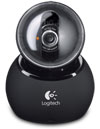
Use the provided USB cable to connect your computer to the USB port in the center of the desk. Open the Logitech Software, and you are all set. Pan, Tilt, and Zoom controls can all be controlled using the Logitech software.. The camera has been tested with Skype and WebEx, and should work with all other videoconferencing software.


